
Microsoft Defender for Business: What You Need to Know
- Cyber Security
- M365


Microsoft 365 Copilot for Business is Microsoft’s AI assistant built directly into familiar tools like Outlook, Word, Excel, Teams, and SharePoint. For ICT managers and IT leaders, the real question isn’t whether Copilot is clever, but whether it can be rolled out safely, sensibly, and in a way that actually helps the business.
If you’re weighing up Copilot for your organisation, it’s worth checking how it fits with your current Microsoft 365 setup, security posture, and governance model. If you want a second opinion, you can get in touch with our team for a practical readiness check.

Microsoft 365 Copilot for Business uses large language models alongside your organisation’s Microsoft 365 data to assist users inside the apps they already use every day.
In practical terms, Copilot can:
Copilot doesn’t replace staff or make decisions for them. It works as an assistant, helping reduce repetitive work and speeding up common tasks using the data users already have access to.
A good starting point is identifying where teams spend time searching, summarising, or reworking information. Those are usually the areas where Copilot delivers the most value.
When implemented properly, Microsoft 365 Copilot for Business can support both productivity and consistency across teams.
Common benefits we see include:
Copilot tends to work best in organisations where content is already well organised and permissions are under control. If file access is messy, Copilot will surface that mess very quickly.
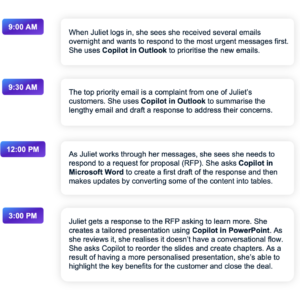
Rather than talking about Copilot in the abstract, it helps to see how it fits into a normal workday.
The example below is Microsoft’s own scenario, showing how Copilot is embedded directly into the Microsoft 365 tools people already use. It follows a sales manager going through everyday tasks, pulling together information, drafting content, and staying on top of work without constantly jumping between apps.
It’s a useful way to visualise where Copilot can genuinely save time and reduce context switching, assuming the right foundations around data access, security, and governance are already in place.
Rolling out Copilot isn’t just a licensing exercise. A bit of preparation goes a long way.
Microsoft 365 Copilot for Business requires eligible Microsoft 365 plans such as Business Premium, E3, or E5, with Copilot licensed separately. Licensing can and does change, so it’s worth confirming what applies to your tenant before committing (especially with recent Intune and endpoint management changes that affect how these licences are applied and managed).
Copilot respects existing permissions. That’s good news, but it also means any over-permissioned data will be easier to find.
Before rollout, it’s smart to:
If you’re unsure where to start, our guide on four free tips to secure Microsoft 365 is a useful baseline.
Start with a small group of users who are comfortable testing new tools. This helps surface real-world issues before wider adoption.
Copilot isn’t magic. Staff need guidance on prompting, validating outputs, and understanding limitations. Clear examples and guardrails make a big difference.
ICT teams play a key role in setting Copilot up for success.
Recommended practices include:
These steps align closely with broader cyber security and cloud governance practices, rather than sitting off to the side as an “AI project”.

Like any new platform feature, Copilot comes with some common hurdles.
Copilot doesn’t create new access, but it does make existing access more visible. Cleaning up permissions early prevents awkward surprises later.
Staff should treat Copilot as a starting point, not the final answer. Training and internal guidelines help set that expectation.
Copilot works best within Microsoft 365. Older line-of-business systems may not integrate cleanly without additional planning or automation.
If you’re modernising your environment, our post on 5 steps to a smooth Microsoft 365 migration provides a useful framework.
Copilot isn’t a great fit for every organisation right now. In particular:
In these cases, Copilot often highlights existing problems rather than delivering immediate value. That doesn’t mean “never”, but it may mean “not yet”.
Copilot is most effective when it supports existing workflows rather than trying to replace them.
Microsoft 365 Copilot for Business can be a genuinely useful addition for organisations already invested in Microsoft 365, but the value comes from thoughtful rollout rather than rushing in.
With the right licensing, security controls, and user guidance in place, Copilot can help reduce busywork and improve how teams use the tools they already have.
If you’d like help assessing readiness, running a pilot, or rolling Copilot out safely, get in touch with our team and we can talk it through.




Got questions, ideas, or just want to chat? We'd love to hear from you! Reach out to us anytime, and we'll get back to you with all the help and information you need.