
Microsoft Defender for Business: What You Need to Know
- Cyber Security
- M365


Microsoft’s Patch Tuesday schedule is a key part of the IT calendar. It’s the monthly reminder that keeping systems secure sometimes means bracing for a few surprises along the way. While patches are designed to fix vulnerabilities and improve reliability, every IT team knows there’s always a little nervousness before clicking “deploy”.
Knowing the Patch Tuesday schedule helps ICT managers plan maintenance windows, test updates properly and minimise disruption when Microsoft’s latest fixes arrive.
Below you’ll find the full Patch Tuesday calendar for 2026 and 2027, along with practical advice for planning, testing and deploying updates across your environment.
Microsoft releases its monthly security updates on the second Tuesday of every month (US Pacific Time). For organisations in Australia, updates typically become available on Wednesday morning (AEST or AEDT).
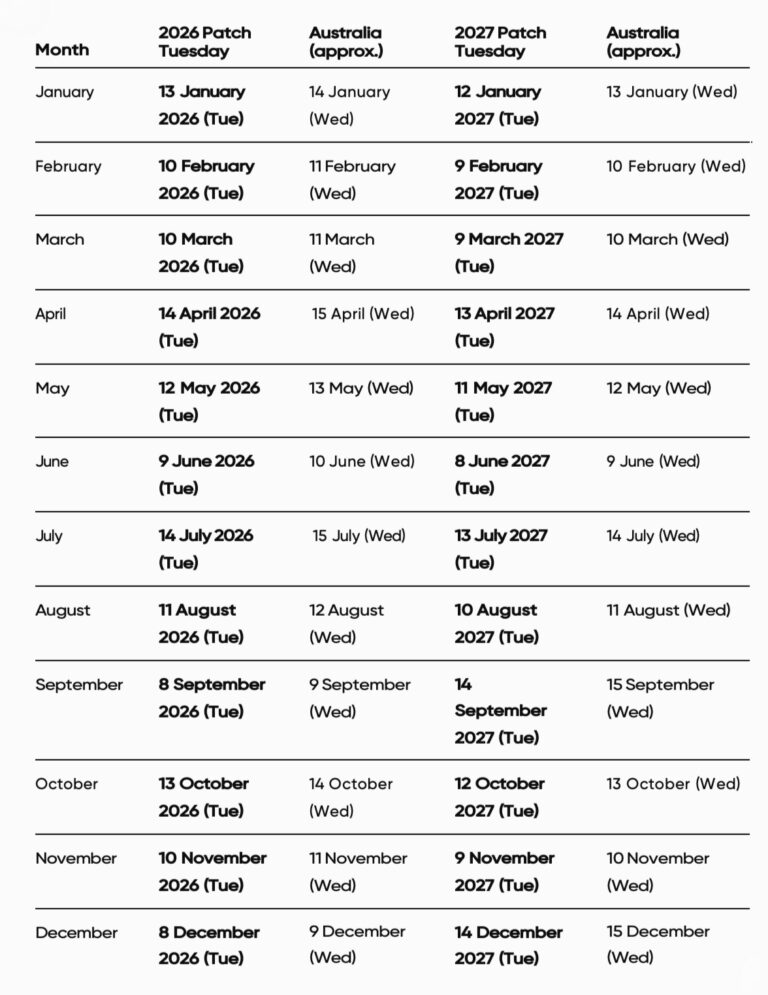
Note: Microsoft occasionally releases out-of-band security updates outside the regular Patch Tuesday schedule to address particularly serious vulnerabilities. Always monitor Microsoft’s Security Update Guide for urgent releases.
Every Patch Tuesday includes fixes for Windows, Microsoft 365 and other Microsoft products. While not every update addresses critical vulnerabilities, many include important security patches that help protect organisations against newly discovered threats.
Attackers often begin analysing Microsoft’s updates as soon as they’re released to identify vulnerabilities in unpatched systems. That’s why having a consistent deployment process is just as important as applying the updates themselves.
If you’re looking for a more detailed explanation of Microsoft’s monthly release cycle, our guide to What Is Patch Tuesday? (And Should You Be Worried?) covers the basics.
Rather than deploying updates as soon as they become available, most organisations follow a staged rollout to reduce the risk of business disruption.
A practical monthly process looks something like this.
Once updates are released:
Avoid deploying updates to every device immediately.
Instead:
If no issues are identified after testing, begin a phased rollout across the wider organisation.
A staged deployment helps minimise disruption.
Many organisations patch in this order:
Once complete, review any failed installations and confirm all critical devices have successfully updated.
If your organisation still relies on manual patching, our Vulnerability Management Services can help automate much of this process while improving visibility across your environment.
Even mature IT teams can experience patching issues. Here are some of the most common mistakes to avoid.
Delaying updates for weeks leaves systems exposed to vulnerabilities that attackers may already understand.
Testing updates is sensible. Leaving them unapplied indefinitely isn’t.
Rolling out updates organisation-wide without testing can create widespread issues if an application is incompatible.
A pilot group gives you the opportunity to identify problems before they affect the business.
Hybrid work has made patch management more challenging.
Ensure laptops continue receiving updates even when they’re rarely connected to the office network. Devices used by remote employees should still be monitored, patched and included in your regular compliance reporting, regardless of where they’re located.
Microsoft updates are only part of the picture.
Browsers, Adobe products, Java, PDF readers and other business software also require regular patching.
A good patch management process includes reporting.
Track:
This gives ICT managers confidence that updates are actually being installed rather than simply scheduled.
Patching is one layer of an effective cyber security strategy, but it shouldn’t be the only one.
Strong organisations also invest in:
Our article on Four free tips to secure Microsoft 365 covers several additional improvements that work alongside regular patch management.
Many organisations also combine regular patching with our Cyber Security services to improve visibility, monitor threats and reduce overall risk.
Because Microsoft releases updates on Tuesday in the United States, Australian organisations usually receive them on Wednesday morning, depending on daylight saving and time zone differences.
Yes. Microsoft occasionally releases out-of-band updates when a critical vulnerability requires immediate attention.
Most organisations test updates first before deploying them broadly. Critical security updates should generally be prioritised, while balancing the need to minimise disruption to business systems.
Most organisations patch servers during scheduled maintenance windows after testing updates in a non-production environment.
The Patch Tuesday schedule gives IT teams a predictable monthly opportunity to strengthen security, improve stability and reduce cyber risk.
By planning around Microsoft’s release cycle, testing updates before deployment and monitoring compliance across your environment, you’ll be in a much better position to keep systems secure without disrupting users.
If you’d like to review your patch management process or automate software updates across your environment, get in touch with our team. We’re always happy to help organisations improve security while making IT easier to manage.





Got questions, ideas, or just want to chat? We'd love to hear from you! Reach out to us anytime, and we'll get back to you with all the help and information you need.