
When it comes to Google Workspace vs Microsoft 365 security, every business wants to know the same thing: which one actually keeps your data safer?
Both platforms are huge. Both spend billions on security. But here’s the kicker — neither is truly “secure by default.” The difference comes down to how well they’re set up, managed, and monitored.
In this post, we’ll break down the security features of both platforms, highlight what’s new, and help you figure out which option makes more sense for your business.

Cyberattacks are only getting more common, and business email and collaboration tools are prime targets. For any business — whether you’re a five-person team or a big enterprise — moving to the cloud with Google or Microsoft is a smart step. But it doesn’t mean you can relax.
Both platforms include essential tools like:
But relying on default settings is where many businesses trip up. Hackers know the defaults. That’s why real protection requires fine-tuning, monitoring, and training your staff to recognise threats.
Recently, Workspace and Chrome gained new protections designed to stop one of the biggest threats facing businesses today: stolen credentials. These new features include:
These upgrades make Workspace stronger against credential theft — one of the biggest threats businesses face today.
Microsoft 365’s strength lies in its depth and flexibility. For businesses on Business Premium or Enterprise plans, the toolkit is extensive:
Advanced features like geo-blocking, attack surface reduction rules, and risk-based sign-ins give Microsoft an edge for large or regulated organisations.
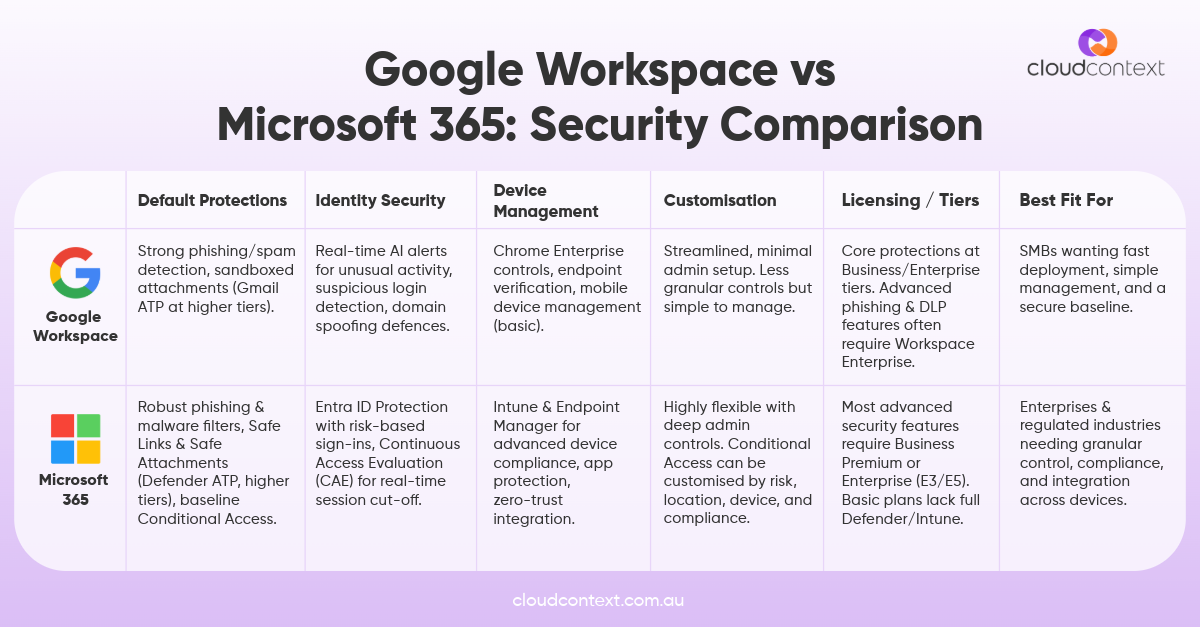
Many businesses assume Microsoft or Google handle all the security. The reality: out-of-the-box settings leave gaps. For example:
Security is only as strong as your configuration and training.
At the end of the day, it’s not really about whether Google or Microsoft wins — it’s about whether your setup is secure. Both platforms can protect your business, but only if they’re configured and managed properly.
👉 Google Workspace is simple, streamlined, and easier to manage — great for small to mid-sized teams.
👉 Microsoft 365 is flexible, powerful, and highly customisable — perfect for bigger organisations or those in regulated industries.
At Cloud Context, we help Australian businesses get the most out of Microsoft 365 while making sure their security is watertight from day one.
If you’re thinking about switching platforms — or just want to know if your setup is as safe as it could be — get in touch with our team.
And if you’re already using Microsoft 365 and want practical ways to lock it down further, check out our tips for securing Microsoft 365.





Got questions, ideas, or just want to chat? We'd love to hear from you! Reach out to us anytime, and we'll get back to you with all the help and information you need.